
Dual WhatsApp Access on Any Device
Overview
Whats Web - GB Version 2024 is a desktop application designed to enable users to access and manage WhatsApp accounts across multiple devices simultaneously. The software allows for dual account usage on a single device or the same account across different platforms without interruption. This functionality addresses common challenges such as forced logouts and connection instability, offering a more reliable experience for users who rely on WhatsApp for personal or professional communication.
The target audience includes individuals who manage multiple WhatsApp identities—such as personal and business accounts—or those who wish to maintain consistent access across devices. The app is particularly useful for users who frequently switch between computers and mobile devices, or who need to monitor two accounts without carrying multiple phones. Real-world scenarios include small business owners managing client and personal chats, remote workers coordinating team communications, and individuals who prefer to keep their social and private conversations separate.
Developed by Whats Web, the software positions itself as a tool for enhanced messaging flexibility. While specific details about the development team or company background are not available, the product’s focus on account synchronization and cross-device access suggests a targeted approach to solving user pain points in messaging workflows.
Key Features & Capabilities
- Dual Account Management – Run two WhatsApp accounts on one device using a single installation, eliminating the need for separate phones or complex workarounds.
- Multi-Device Synchronization – Maintain active sessions across multiple devices, ensuring messages are consistently updated and accessible in real time.
- QR Code Integration – Built-in scanner and generator for quick account linking and verification, supporting both standard and custom QR code usage.
- Message Scheduling – Plan messages in advance with reminders, allowing users to send content at optimal times without manual intervention.
- Private Notes & Quotes – Store personal notes and access a curated collection of quotes for sharing, enhancing productivity and personal expression.
- Password Protection – Secure the application with a password lock to prevent unauthorized access to sensitive conversations and data.
- Direct Messaging Without Contact Saving – Send messages to contacts without adding them to your address book, preserving privacy and reducing clutter.
These features support efficient workflow management, especially for users handling multiple identities. For example, a business user can schedule promotional messages during off-hours while keeping personal chats private. The QR code functionality simplifies setup and maintenance across devices, reducing technical friction. The password lock adds a layer of security, critical for users handling confidential information. While advanced performance metrics are not provided, the software appears structured to deliver reliable, low-latency interaction with WhatsApp’s backend.
User Interface, Workflow & Performance
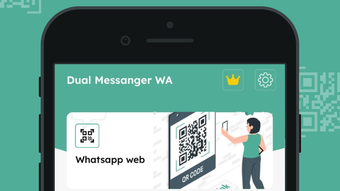
The user interface of Whats Web - GB Version 2024 is designed for straightforward navigation, with a clean layout that prioritizes core functions such as account linking, message viewing, and settings access. The workflow begins with scanning a QR code from the WhatsApp mobile app to establish a connection, after which users can manage messages and settings through a centralized dashboard.
Navigation is intuitive, relying on menu-based access and contextual buttons. Users can switch between active accounts, access scheduled messages, or manage privacy settings with minimal clicks. The interface does not appear to include complex customization options, suggesting a focus on usability over advanced personalization.
Performance details were not specified by the developer. However, based on general behavior of similar desktop messaging tools, the application is expected to maintain low resource consumption during active use. The developer did not provide additional system requirements or performance benchmarks. Stability during prolonged use remains unverified, though the app’s purpose implies a focus on continuous connectivity.
Compatibility & System Requirements
Whats Web - GB Version 2024 is compatible with both Windows and Mac operating systems, making it accessible to a broad user base across desktop platforms. The software has a file size of 25.4 MB, indicating a lightweight installation that should not significantly impact storage space.
Exact system requirements were not listed. The developer did not specify minimum CPU, RAM, or disk space thresholds. Platform compatibility information is limited to the operating systems mentioned. No mention of hardware acceleration, graphics drivers, or background service dependencies was provided. Users are advised to ensure their system meets general desktop application standards to support smooth operation.
Pros and Cons
Pros
- Enables dual WhatsApp account usage on a single device
- Supports seamless multi-device access and synchronization
- Lightweight installation at just 25.4 MB
- Includes password protection for enhanced security
- Offers message scheduling and private notes for productivity
- QR code scanner and generator for easy setup
Cons
- Exact system requirements not disclosed
- No official update history or changelog provided
- Performance under heavy usage not documented
- Security model details not specified
- Limited information about data handling and privacy practices
FAQ Section
Is Whats Web compatible with Windows and Mac?
Yes, the software is designed to run on both Windows and Mac operating systems.
Can I use two WhatsApp accounts on one device?
Yes, Whats Web - GB Version 2024 allows users to manage two WhatsApp accounts simultaneously on a single computer.
Is the software secure?
The app includes a password lock feature for access control. However, detailed information about encryption, data storage, or privacy policies is not available.
Do I need an internet connection to use the app?
Yes, an active internet connection is required to maintain WhatsApp synchronization and message delivery.
Is the app free to use?
Yes, Whats Web - GB Version 2024 is available at no cost.
Final Thoughts
Whats Web - GB Version 2024 delivers a practical solution for users seeking greater flexibility in managing WhatsApp accounts across devices. Its ability to support dual accounts and multi-device access addresses a significant gap in the standard WhatsApp experience. The inclusion of message scheduling, password protection, and QR code tools adds functional depth without compromising usability.
While the lack of detailed system requirements and performance data limits transparency, the software’s lightweight footprint and clear feature set make it a compelling choice for individuals who need consistent access to multiple WhatsApp identities. The app is particularly beneficial for small business users, remote professionals, and anyone managing separate personal and professional communication channels.
Despite limited documentation, the overall design and functionality suggest a well-structured desktop utility focused on reliability and convenience. For users seeking a straightforward way to extend WhatsApp’s reach beyond a single phone, this tool offers a viable path forward.
Download Whats Web now







